In the last issue, after the fashionstar bus steering gear was controlled by the X3PI, the robot already had basic motion functions, but it was only open-loop motion control without any feedback function. Self-dynamic balance control is very important for foot robots, drones and balance cars. For example, I made a biped robot before. Adjust your balance by detecting your tilt Angle.
So today I introduce the method used based on the MPU6050 Angle sensor module. The MPU6050 module used is integrated into the fashionstar steering gear control board, which is very convenient and can be used by inserting the board into the 40pin pin of the X3 PI. The MPU6050 module is shown in the following figure:
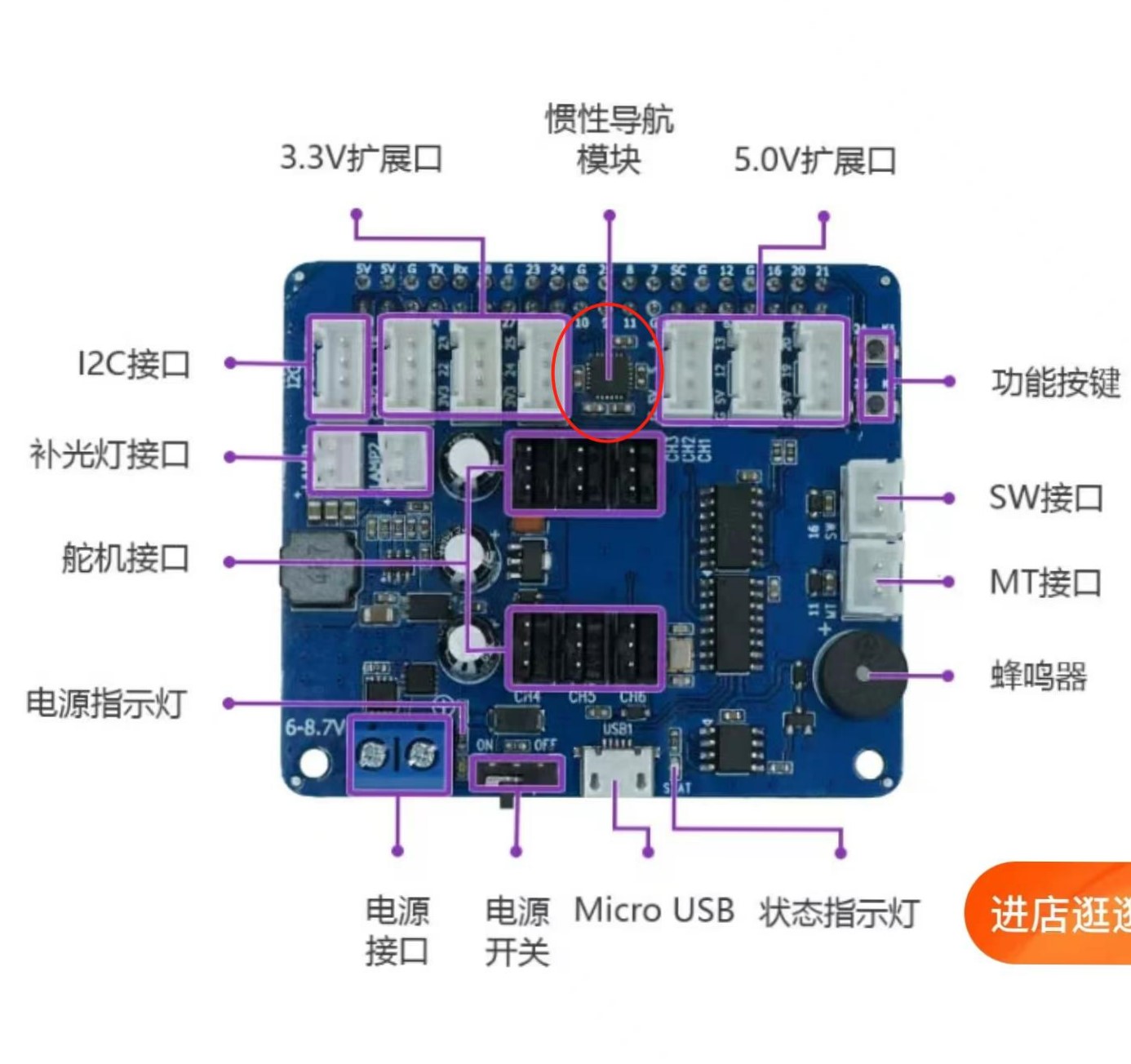
Next, we start to use the MPU6050 module. After plugging in the fashionstar steering gear control board and starting up, several dependency libraries need to be installed first:
sudo apt-get install i2c-tools
sudo apt-get install python3-smbus
sudo apt-get install mpu6050-raspberrypi
# This package I follow the process of MPU6050 on the Raspberry PI, and can also be installed on the X3 PI, but whether it is really used remains to be seen.
After installing these three dependent libraries, it is necessary to verify that I2C can read the MPU6050 port. Enter:
sudo i2cdetect -y -a 0
0 1 2 3 4 5 6 7 8 9 a b c d e f 00: – – – – – – – – – – – – – 10: – – – – – – – – – – – – – – – – 20: – – – – – – – – – – – – – – – – 30: – – – – – – – – – – – – – – – – 40: – – – – – – – – – – – – – – – – 50: – – – – – – – – – – – – – – – – 60: – – – – – – – – 68 – – – – – – – 70: – – – – – – – –
If so, the read was successful.
Reading the data on mpu6050 requires two py programs (programs in the attachment), degree.py and mpu6050.py, which need to be placed in a folder, for example, I put them in the /home/path.
Terminal run degree.py:
sudo python3 degree.py
import time import subprocess #import logging import serial import struct from time import sleep from mpu6050 import mpu6050 import numpy as np sensor = mpu6050(0x68) #logging.basicConfig(level=logging.INFO) while(1): accel_data = sensor.get_accel_data() print(“Accelerometer data”) print("x: " + str(accel_data[‘x’])) print("y: " + str(accel_data[‘y’])) print("z: " + str(accel_data[‘z’])) gyro_data = sensor.get_gyro_data() print(“Gyroscope data”) print("x: " + str(gyro_data[‘x’])) print("y: " + str(gyro_data[‘y’])) print("z: " + str(gyro_data[‘z’])) temp = sensor.get_temp() print("Temp: " + str(temp) + “C”) time.sleep(0.01)
import time import subprocess #import logging import serial import struct from time import sleep from mpu6050 import mpu6050 import matplotlib.pyplot as plt import numpy as np sensor = mpu6050(0x68) #logging.basicConfig(level=logging.INFO) plt.axis([0,200,-120,120]) plt.ion() xs = [0,0] ys1 = [0,0] ys2 = [0,0] i=0 while(1): accel_data = sensor.get_accel_data() gyro_data = sensor.get_gyro_data() temp = sensor.get_temp() xs[0]=xs[1] ys1[0]=ys1[1] xs[1]=i ys1[1]=9*accel_data[‘x’] xs[0]=xs[1] ys2[0]=ys2[1] ys2[1]=9*accel_data[‘y’] plt.plot(xs,ys1) plt.plot(xs,ys2) i = i+1 plt.pause(0.01)
得到的效果: